Xbox Storage Expansion: Worth It? 1TB vs 2TB, Cost, and How-To
Few things kill a game session faster than the “storage full” notification. You buy a few heavy hitters like Call of Duty or Forza, and suddenly your Xbox Series X|S is begging for room, but between the official Seagate card, a cheaper external HDD, and a new 4TB option, the choice isn’t as simple as “more GB.”
Official expansion card capacities: 512 GB, 1 TB, 2 TB ·
Price range (US MSRP): $139.99 – $399.99 ·
Maximum speed: 2.4 GB/s (matches internal SSD) ·
Compatibility: Xbox Series X|S only ·
Average game size: 50–100 GB per game
Quick snapshot
- Seagate is the only licensed expansion card manufacturer (Tom’s Hardware)
- Series X|S games require internal or expansion card speeds (Windows Central)
- Future third-party licensed cards may appear (GamesRadar)
- Long-term reliability of expansion cards (GamesRadar)
- 4TB Seagate card announced June 2025 (Windows Central)
- WD Black C50 competes on price below Seagate (GamesRadar)
Here is how the main storage options compare on cost and capability.
| Storage option | Capacity range | Price range (US) | Plays Series X|S games directly? | Ideal for |
|---|---|---|---|---|
| Official expansion card (Seagate/WD) | 512GB–4TB | $140–$500 | Yes | Playing modern games at full speed |
| External USB HDD | Up to 8TB | $20–$120 | No (store only) | Backward-compatible games and archival |
| External USB SSD | Up to 4TB | $50–$250 | No (store only) | Faster transfer than HDD |
Three storage paths, one trade-off: the expansion card is the sole route to play Series X|S titles externally, and it charges a premium for that speed.
Are Xbox storage expansions worth it?
When the expansion card is necessary
If you own an Xbox Series S (the all-digital 512GB model), you’ll feel the squeeze fast. Tom’s Hardware notes that Series X|S games require the custom Velocity Architecture speeds — meaning only the internal SSD or an official expansion card can run them.
Cost vs. performance analysis
At October Prime Day, the 1TB Seagate card sold for $129 and the WD Black C50 for $120, per Tom’s Hardware. By contrast, a 1TB external HDD goes for under $40. The catch: that HDD can’t play your new games. GamesRadar recommends the WD Black C50 as the best value expansion card, noting its slightly lower price than Seagate.
User reviews and longevity
Owners on retailer pages report the expansion card works flawlessly — plug, play, no slowdown. The 2TB version at $250 (on sale) hits the sweet spot for many, storing 20–30 games. The trade-off: you pay more upfront, but you avoid long transfer times.
The expansion card turns your Series S into a real competitor. Without it, you’re stuck juggling four games. With a 1TB card, you hold the whole Game Pass library that matters.
Bottom line: The expansion card is the only way to play Series X|S games externally. Heavy gamers: buy 1TB or 2TB. Casual players: an external HDD plus card transfer works fine.
Is a 2 TB card overkill for Xbox?
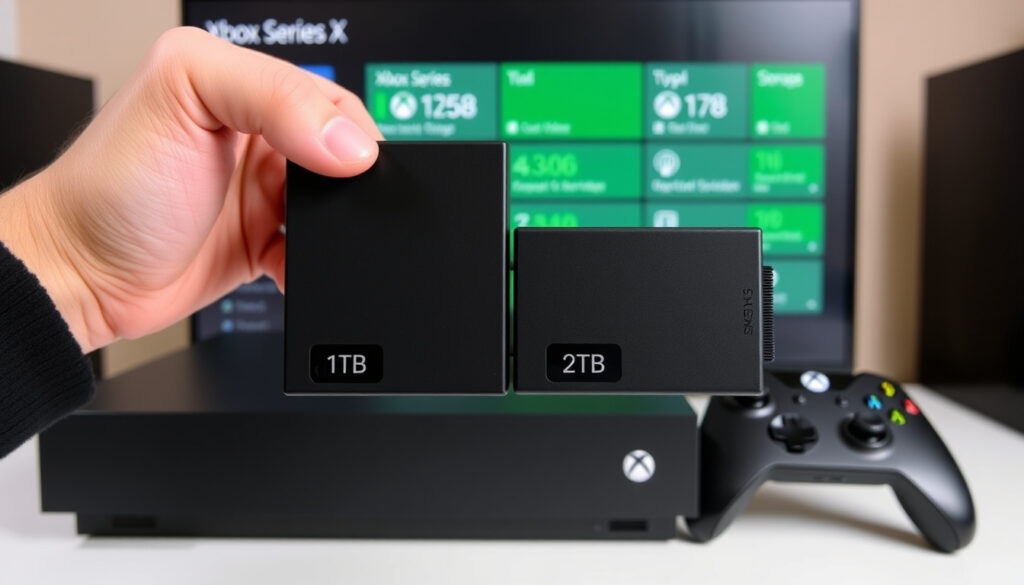
How many games fit on 1TB vs 2TB
Average game size sits between 50–100GB. Windows Central estimates 1TB holds 10–20 games, 2TB holds 20–40. Call of Duty alone consumes nearly 200GB.
Who should choose 2TB
If you play more than five large games at once, 2TB makes sense. The 2TB Seagate card lists at $359.99 but often sells for $249.99 or less, according to Windows Central. That’s ~$6.25 per game vs. ~$13 for a 1TB card at full price.
Cost difference between 1TB and 2TB
The gap is about $180 at MSRP, but sale prices narrow it. GamesRadar reports the 2TB Seagate at ~$290 and the 2TB WD Black C50 at $249.99. The extra terabyte costs roughly 70% more – but if you buy on discount, the per‑GB cost drops.
2TB is overkill only if you finish one game before starting the next. For download‑happy gamers who never delete, it’s the right call – and the 4TB is for collectors.
Can I add more storage to my Xbox?
Using the official Seagate expansion card
Press the card into the rectangular slot on the back of the console. The console detects it instantly. Xbox Support confirms it’s a plug‑and‑play, no formatting required. Cards come in 512GB, 1TB, 2TB, and as of June 2025, a 4TB option.
Connecting an external USB 3.0 HDD or SSD
Any USB 3.0 drive works. Plug it in, go to Settings > System > Storage, and format it for Xbox games. TechRadar notes that external hard drives cost a fraction of expansion cards.
Step-by-step installation guide
- Turn off your Xbox completely.
- Insert the expansion card into the rear port (or plug external drive into USB-A).
- Power on. A prompt will ask you to format the drive.
- Choose “Format storage device” and name it.
- Go to My games & apps > Manage > Move or copy to transfer games.
That’s it. Xbox Support advises that Series X|S titles must be on internal or expansion card to play, but can be stored on USB drives and moved back when ready.
Is there a cheaper way to get extra storage on your Xbox?
External USB HDD as a budget option
Yes – a 4TB external HDD costs around $80, offering $0.02 per GB. TechRadar calls this “a fraction of the price” of a 1TB expansion card. But you can only play Xbox One, 360, and OG Xbox games from it directly.
Certified alternatives to the Seagate card
GamesRadar highlights the WD Black C50 as a fully licensed alternative. It uses the same CFexpress slot and delivers identical speeds. The 1TB model regularly matches or undercuts Seagate’s price.
Trade-offs: load times and game compatibility
An external USB SSD loads backward-compatible games faster than an HDD, but still can’t play Series X|S titles. The practical workaround: store your modern games on the cheap drive and copy them to internal when you want to play – a 50GB game transfers in about 4 minutes via USB 3.0.
No third party besides Seagate and Western Digital has licensed an Xbox expansion card. Any “Xbox SSD” claiming compatibility without the official badge is likely for USB storage only – useless for Series X|S games.
How much is an Xbox storage expansion?
Official pricing for 512GB, 1TB, 2TB, 4TB
On Xbox.com, retail prices are: 512GB at $139.99, 1TB at $219.99, 2TB at $399.99, and the new 4TB at $499.99. Windows Central reports the 2TB often drops to $249.99 and the 1TB to $129.99 during sales.
Price trends and discounts
Sales are frequent. Tom’s Hardware recorded Prime Day prices of $120–$129 for both 1TB cards. GamesRadar notes the Seagate 1TB had dropped to match the C50 at $159. Seasonal events like Black Friday push the 2TB under $220.
Where to buy: official store, Amazon, CeX
Amazon and Best Buy routinely match sale prices. CeX Ireland lists used 1TB cards for €150. Prices vary by region – GamesRadar notes UK pricing often runs £159 for 1TB and £215 for 2TB.
Upsides
- Plug‑and‑play – no cables, no formatting
- Identical speed to internal SSD (2.4 GB/s)
- Works with Xbox Series X|S and (via external) older titles
- Consistent sale pricing on 1TB and 2TB models
Downsides
- High cost per GB compared to external HDD
- Proprietary slot – no normal NVMe upgrade like PS5
- Limited capacity choices (only 512GB, 1TB, 2TB, 4TB)
- 4TB model at $500 feels steep for storage
Clarity check
Confirmed facts
- Seagate and Western Digital are the only licensed manufacturers (Tom’s Hardware)
- Expansion card delivers full Velocity Architecture speed (Xbox Support)
- External USB drives cannot play Series X|S games directly (Windows Central)
- 4TB card launched in June 2025 (Windows Central)
What’s unclear
- Whether third-party cards from other brands will ever be licensed
- Longevity of the proprietary slot in future console generations
- Tracking best value across regions is tricky as GamesRadar reports “prices vary”
The pattern is clear: proprietary speed comes at a premium, while standard storage offers affordability at the cost of compatibility.
“The Xbox Series X|S storage expansion cards are proprietary accessories made for the console’s expansion slot, not standard NVMe SSDs. Users cannot upgrade the storage with a standard M.2 SSD the way they can on PlayStation 5.”
— Tom’s Hardware
“The 4TB Seagate Storage Expansion Card for Xbox Series X|S became official on June 9, 2025. It retailed for $499.99 and was discounted to $429.99 at the time of publication.”
— Windows Central
Storage isn’t exciting until you run out. For the player who commits to the Xbox ecosystem, the expansion card is the only way to keep playing modern games without shuffling installs. For the budget-conscious, a $40 external HDD paired with smart storage management buys breathing room. The pattern: pay premium for convenience, pay less for patience.
For the American gamer who buys three big titles a year, the 1TB card at $120 on sale is the clear choice: $0.12 per game per year of storage. For the family with multiple users and a backlog stretching back to 2013, a 4TB external HDD plus a 1TB card splits the difference. The decision is clear: store what you play, play what you store – and never pay full price.
For those considering the larger option, our 2TB expansion card review offers a detailed look at whether the extra capacity justifies the cost.
Frequently asked questions
Does the Xbox Series S have expandable storage?
Yes, the Series S has the same expansion slot as the Series X. You can use the official Seagate or WD Black C50 card, or any USB 3.0 external drive (but not for Series X|S games).
Can I use a regular external SSD on Xbox Series X?
Yes, any USB 3.0 SSD works for storing and playing backward-compatible games and for transferring Series X|S titles, but you can’t launch modern games from it directly.
What is the difference between the Seagate expansion card and an external HDD?
The expansion card matches the internal SSD (2.4 GB/s) and plays Series X|S games. An external HDD is much slower (150 MB/s) and runs only Xbox One and older titles.
Will a 2TB expansion card fit all my games?
With 20–40 games (at 50–100GB each), a 2TB card holds a large library. Only the 4TB card can fit over 40 titles at once.
How do I transfer games to the expansion card?
Go to My games & apps > Manage > select a game > Move or copy > choose the expansion card as the destination. A 50GB game copies in about 2 minutes.
Is the expansion card compatible with Xbox One?
No. The expansion card uses the Xbox Series X|S proprietary slot. It will not physically fit in an Xbox One.
Can I use the expansion card on PC?
Yes, it is a standard CFexpress card. Windows can read it, but you need a CFexpress reader and it won’t be bootable.
More related posts