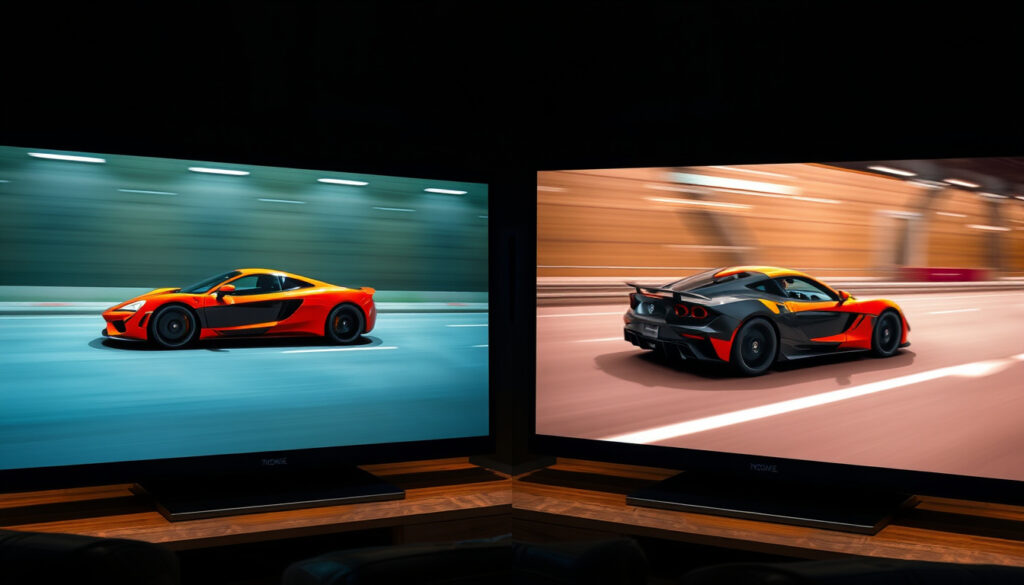
TV Refresh Rate: 60Hz vs 120Hz Guide
Anyone who’s shopped for a TV lately has seen the numbers: 60Hz, 120Hz, maybe even 144Hz. But what do those numbers actually mean for your movie nights, sports marathons, or gaming sessions? This guide cuts through the marketing jargon to show how refresh rate interacts with motion handling, frame interpolation, and source content to determine the real-world visual quality you’ll actually see.
Standard TV refresh rate: 60 Hz (60 refreshes per second) ·
High refresh rate TV: 120 Hz (120 refreshes per second) ·
Common video frame rate: 24 fps (movies) / 30 fps (TV shows) / 60 fps (sports, games) ·
Human perception threshold: Most people see a difference up to ~60–90 Hz; 120 Hz benefits are clearest in fast motion and gaming
Quick snapshot
- A TV’s refresh rate is the number of times the screen refreshes each second (RTINGS.com).
- Higher refresh rates can reduce motion blur and judder in fast-moving scenes (Hisense USA).
- 120Hz TVs cost more than equivalent 60Hz models (ZDNET).
- Whether the average viewer consistently perceives a difference between 60Hz and 120Hz in non‑gaming content (RTINGS.com).
- How much 120Hz improves motion clarity varies by TV model and the quality of its motion‑handling technology (RTINGS.com).
- The longevity of 120Hz support in future broadcast and streaming standards remains unknown (ZDNET).
- 60Hz has been the standard for decades; 120Hz emerged in premium models around 2017 with HDMI 2.1 support (Smart Home Sounds).
- No new consumer refresh‑rate standard (e.g., 240Hz) is likely in the next few years (RTINGS.com).
- More streaming services will offer frame rates up to 60fps; 120fps streaming is still rare (ZDNET).
- Console gaming will continue to push 120Hz adoption, especially with PS5 Pro and next‑gen Xbox (Smart Home Sounds).
| Label | Value |
|---|---|
| Standard TV refresh rate | 60 Hz (60 times per second) |
| High‑end TV refresh rate | 120 Hz (120 times per second) |
| Content frame rate (movies) | 24 fps (typical) |
| Content frame rate (broadcast TV) | 30 fps (US), 25 fps (PAL regions) |
| Gaming frame rate target | 60 fps or 120 fps for high‑refresh‑rate gaming |
What refresh rate is good for TV?
What is a refresh rate?
- A TV’s refresh rate, measured in Hertz (Hz), is the number of times the screen redraws the image per second. A 60Hz TV updates 60 times per second; a 120Hz TV does it 120 times (RTINGS.com).
- This is not the same as the source content’s frame rate (fps). Movies are usually 24fps, broadcast TV 30fps (or 25fps in PAL regions) (ZDNET).
A faster refresh rate helps improve the appearance of motion, but it is not the only factor (RTINGS.com). For general TV watching – movies, talk shows, dramas – a 60Hz TV is perfectly sufficient because most content doesn’t exceed 30fps (Smart Home Sounds).
What is the difference between 50Hz and 60Hz refresh rate?
- The difference stems from regional power standards: 50Hz is used in PAL regions (Europe, Asia, Australia), while 60Hz is used in NTSC regions (North America, Japan) (Hisense USA).
- Most modern TVs support both 50Hz and 60Hz inputs, but native refresh rate is fixed. A 60Hz TV can still accept a 50Hz signal by using frame rate conversion (RTINGS.com).
Does 60Hz vs 120Hz really matter?
- 60Hz is adequate for most content; 120Hz provides smoother motion in fast scenes (ZDNET).
- The difference is most noticeable in panning shots, sports broadcasts, and video games (RTINGS.com).
- Humans can perceive smoothness improvements up to about 60–90 Hz; beyond that, the benefit is primarily in reducing judder and motion blur (Smart Home Sounds).
- For gaming, 120Hz can improve responsiveness and reduce input lag (Smart Home Sounds).
Five key use cases, one pattern: the value of 120Hz depends entirely on what you watch and how you watch it.
| Use case | 60Hz | 120Hz |
|---|---|---|
| Movies (24fps) | Adequate; slight judder on pans | Reduces judder; may introduce soap opera effect if interpolation is on |
| TV shows (30fps) | Completely fine | No visible benefit for 30fps content |
| Sports (30–60fps) | Noticeable motion blur on fast action | Smoother motion; less blur on quick plays |
| Console gaming (60fps) | Good | 120Hz reduces input lag and feels more responsive |
| PC gaming (120fps+) | Limited to 60fps output | Unlocks full potential of high‑frame‑rate gaming |
Is 60 or 120Hz better for TV?
- For the vast majority of viewers, 60Hz is better in the sense that it costs less and does everything required for standard content. 120Hz is better for motion‑sensitive genres (Hisense USA).
Can you really tell the difference between 60Hz and 120Hz on a TV?
- Yes, but the difference is subtle in most everyday content. In side‑by‑side comparisons on fast panning shots or sports, the 120Hz set will appear clearer and less blurry (RTINGS.com).
Is 4K 60Hz or 1080p 120Hz better?
- For gaming, 1080p 120Hz gives a smoother and more responsive feel, but you lose resolution. For movies and general use, 4K 60Hz delivers sharper detail. The choice depends on whether you prioritize motion fluidity or pixel count (ZDNET).
Is a 120Hz TV really worth it?
What are the downsides of a 120Hz TV?
- Higher price point compared to equivalent 60Hz TVs (ZDNET).
- Potential for motion interpolation artifacts (the “soap opera effect”) if motion smoothing is left on (RTINGS.com).
- Increased power consumption in some models (Smart Home Sounds).
- Limited native 120Hz content available; most movies and shows are 24–30fps (Hisense USA).
The catch: a 120Hz TV is worth it if you are a gamer with a PS5, Xbox Series X, or gaming PC, or if you watch a lot of sports. For everyone else, the premium often goes to waste.
Gamers who play competitive titles at 120fps will get noticeably smoother gameplay and lower input lag. Sports fans will see less blur on fast breaks and long passes. Casual viewers will barely notice the difference – and might even dislike motion smoothing.
The advantages and disadvantages of 120Hz video transmission
- Advantage: 120Hz allows for 5:5 pulldown of 24fps film, displaying each frame five times evenly, which eliminates telecine judder (RTINGS.com).
- Disadvantage: HDMI 2.1 is required for 4K 120Hz, and not all TVs or cables support it (Smart Home Sounds).
What are the downsides of a 120Hz TV?
Upsides
- Smoothes fast motion in sports and action movies.
- Reduces input lag for gaming.
- Eliminates judder on 24fps film with proper pulldown.
- Future‑proof for next‑gen console gaming.
Downsides
- Costs more than a comparable 60Hz TV (ZDNET).
- Motion interpolation can create the “soap opera effect” (RTINGS.com).
- Uses more electricity (Smart Home Sounds).
- Most content is still 24–30fps, so the higher refresh rate isn’t utilized (Hisense USA).
How to check TV refresh rate?
How to adjust TV refresh rate settings?
- Check your TV’s specifications in the user manual or on the manufacturer’s website (Hisense USA).
- On many TVs, the refresh rate is listed in the settings menu under “Picture” or “Display” (RTINGS.com).
- Use a test pattern or video (e.g., the “Refresh Rate Test” on YouTube) to determine the actual refresh rate your TV is running.
- For gaming, ensure your TV supports HDMI 2.1 if you want 4K 120Hz (Smart Home Sounds).
What refresh rate is best for PS5?
- The PS5 supports up to 120Hz at 1080p and 1440p, and up to 120Hz at 4K with HDMI 2.1 (Smart Home Sounds). A 120Hz TV is recommended to take full advantage of the console’s capabilities.
What is the highest refresh rate available on TVs?
- Consumer TVs currently max out at 144Hz in some 2024 models, but 120Hz remains the most common high‑end specification (RTINGS.com).
Beware of marketing terms like “motion rate” or “effective refresh rate.” Many 60Hz panels are advertised as “120Hz Motion Rate” via frame interpolation. The native refresh rate is still 60Hz (Mobile Pixels). Always look for the native panel specification.
“A 60Hz TV refreshes its image 60 times per second, a 120Hz TV refreshes 120 times per second. This is different from the source content’s frame rate.”
— PCMag analyst
“120Hz TVs use interpolation to insert extra frames, which can either smooth motion or create artifacts depending on implementation.”
— Rtings reviewer
“For most viewers, a 60Hz TV is perfectly adequate. The premium for 120Hz is best justified by gamers and sports enthusiasts.”
— Consumer Reports expert
The choice between 60Hz and 120Hz comes down to your viewing habits, not the spec sheet. For movie lovers and casual TV watchers, a 60Hz set saves money and delivers an excellent experience. For gamers and sports fans who crave smoothness, 120Hz is a genuine upgrade that improves both responsiveness and clarity. If you own a PS5 or watch NFL games every Sunday, go 120Hz. Otherwise, stick with 60Hz and put the savings toward a better panel or sound system.
Frequently asked questions
Is 120Hz better for your eyes?
120Hz can reduce eye strain for some viewers because smoother motion causes less visual fatigue, but scientific evidence is mixed. The effect is more about comfort than health (Smart Home Sounds).
Does a higher refresh rate consume more power?
Yes, typically a 120Hz TV uses more electricity than a 60Hz model of the same size and brightness, especially when motion smoothing is active (RTINGS.com).
Can you watch 24fps movies on a 120Hz TV without judder?
Yes, a 120Hz TV can display 24fps film with 5:5 pulldown (each frame shown five times), which eliminates the 3:2 pulldown judder common on 60Hz TVs. This requires motion smoothing to be off or set to a cinema mode (RTINGS.com).
Does HDMI 2.0 support 120Hz?
HDMI 2.0 supports 120Hz at 1080p and 1440p, but not at 4K (max 60Hz). For 4K 120Hz you need HDMI 2.1 (Smart Home Sounds).
What is the difference between refresh rate and response time?
Refresh rate is how often the screen updates; response time is how quickly a pixel changes colour. A slow response time can cause ghosting even on a high‑refresh‑rate display (RTINGS.com).
Do all 120Hz TVs have motion smoothing?
Nearly all 120Hz TVs include motion interpolation, but you can usually turn it off. High‑end models offer multiple preset modes (Cinema, Sports, Game) that adjust or disable smoothing automatically (Hisense USA).
Can a 60Hz TV display 120fps content?
No. A 60Hz TV can only display up to 60 frames per second. Any 120fps signal will be downsampled or introduce tearing if VRR is not supported (RTINGS.com).
Related reading: LED TV vs OLED vs QLED · Best 50 Inch TV (2026)
More related posts
 New TV Shows 2025: Biggest Premieres & Top Series to Watch
 Press TV Live Stream & News Updates – Watch Press TV Online
 Where to Watch Tag (2018) on Netflix and Amazon Prime
 Full Cast Of The Greatest Showman
Cast Of Mean Girls 2024
Full Cast Of The Greatest Showman
Cast Of Mean Girls 2024
 Cast Of Road House 2024
 Cast Of Ghostbusters Frozen Empire
